Thuisbioscoopontwerp – de videoprojector

Thuisbioscoopontwerp – de videoprojector

DIY Home Theater Design Choosing The Right Projector


Wat ik zocht in een videoprojector

Een van de belangrijkste keuzes bij het ontwerpen van een bioscoop (en mogelijk de duurste) is de videoprojector.

Ik had verwacht dat ik een flink bedrag zou uitgeven, om een ​​goede projector te krijgen. En in de hoop een 4K-projector met internetapps te krijgen (zoals Netflix), 3D zou leuk zijn, meerdere HDMI-ingangen en een beeld dat niet vervaagd was. Omdat mijn bioscoop een paar ramen heeft, Ik wilde iets dat nog steeds zichtbaar zou zijn als de zon de kamer binnenkwam.

Omdat ik nog nooit naar projectoren had gekeken, Ik was echt geschokt toen ik zag hoe hoog de prijzen voor projectoren zijn. Veel van de duurdere dingen zitten in de $ 25,000 – $ 30,000 bereik.

Ik was niet van plan om in de buurt van dat bedrag uit te geven, maar ik wilde wel een hele mooie projector. Na het zien van die initiële prijzen, Ik had een beetje het gevoel dat ik misschien toch niet zou kunnen springen voor een mooie projector. Realistisch gezien had ik verwacht ongeveer €2,- uit te geven,000 misschien tot $3,000.

Gelukkig zijn er een paar projectoren die je veel waar voor je geld bieden, zonder veel geld uit te geven.

Ik heb dit artikel geschreven in de hoop anderen te helpen zich niet zo overweldigd te voelen als ik toen ik projectoronderzoek deed voor hun bioscoop.

Openbaring: Sommige van de onderstaande links zijn gelieerde links. Als u besluit een van deze producten te kopen, We verdienen een kleine commissie zonder extra kosten voor u. We raden deze producten alleen aan omdat we er ervaring mee hebben en ze gebruiken voor onze eigen projecten. Als Amazon Associates, We verdienen aan kwalificerende aankopen.

Wat ik heb geleerd over videoprojectoren

Dus bij het doen van mijn onderzoek, Ik heb een heleboel geleerd. Het is moeilijk om elk aha-moment te onthouden, maar ik ga het eens proberen, hier zijn enkele van mijn aha-momenten.

De projector heeft geen meerdere HDMI-ingangen nodig

Oorspronkelijk dacht ik dat de videoprojector die ik zocht meerdere HDMI-poorten nodig had. Ik zocht er ongeveer 4. Eén voor de kabelbox, DVD-speler, spelconsole en pc.

Blijkt dat als je een thuisbioscoop ontwerpt, De kans is groot dat u een surround sound-systeem gaat installeren.

Bij gebruik van een thuisbioscoopsysteem, het heeft voldoende HDMI-ingangen en je gebruikt het thuisbioscoopsysteem om de ingangen te bedienen.

In mijn scenario, het maakte de zaken veel gemakkelijker. Ik hoefde slechts één HDMI-kabel van 6 meter van het surround sound-systeem naar de projector te leiden, alle andere HDMI-apparaten bevonden zich in dezelfde kast als het surround sound-systeem, dus ik kon HDMI-kabels van normale lengte gebruiken.

Designing a Home Theater - The Video Projector - The HDMI Cable Layout

Videoprojectoren zijn dat niet “Slim”

Een van mijn eerste vereisten was dat het project internetapps had. Wat ik ontdekte was dat projectoren niet echt op smart-tv's lijken, ze lijken meer op computermonitoren… die het beeld op de muur projecteren.

Alle projectoren die ik bekeek hadden er geen “slim” mogelijkheden. Dus om NetFlix te krijgen, Hulu, Amazon enz. Je moet iets aansluiten op de projector die dat heeft “Slim” functies.

Hoe u 4K-inhoud op uw projector kunt krijgen

In mijn opstelling, Ik kocht een Ultra-HD Blu-ray-speler met internet-apps. De Blu-ray-speler is een Samsung UBD-K8500 Ultra HD Blu-ray-speler die 4K doet en ingebouwde WiFi heeft.

Update: Ik probeerde een probleem te achterhalen dat ik had met 3D-inhoud, Ik heb een Pioneer UB900 Ultra HD Blu-ray-speler gekocht. De Blu-ray-speler heeft mijn 3D-probleem niet opgelost (mijn probleem was een defecte projector – die Epson snel repareerde). Maar het verschil in geluid tussen de twee spelers was zo groot dat ik besloot de Pioneer UB900 te behouden.

De Ultra-HD is essentieel als je 4K-content van Netflix wilt. Als u uw abonnement upgradet en Netflix kijkt op een apparaat dat 4K ondersteunt, Netflix krijgt een extra 4K-categorie.

Hoe u HDR-inhoud op uw videoprojector kunt krijgen

Hier is iets waar ik me niet van bewust was. Ik dacht dat het een Blu-ray-dvd was, het zou in HDR worden afgespeeld. Dat klopte helemaal niet.

Om HDR-inhoud op uw projector af te spelen, Eerst, alle apparatuur die de dvd afspeelt, moet HDR-compatibel zijn (projector, DVD-speler, Versterker).

En ten tweede, je hebt een dvd nodig die Ultra-HD is, niet alleen Blu-ray.

Het is gemakkelijk om erachter te komen of de dvd Ultra-HD is. Op de bovenkant van de dvd-doos staat 4K UltraHD – meestal in zilver op een zwarte achtergrond.

Hier is een link van Netflix met details over hoe je 4K-inhoud kunt krijgen:

Dit artikel bevat informatie over het bekijken van Netflix in Ultra HD op compatibele apparaten.

Designing a Home Theater - The Video Projector - Epson Home Cinema 5040UB

Beeldkwaliteit van projector

Afgezien van de optie van 1080p en 4K, er zijn nog twee andere dingen die bijdragen aan de beeldkwaliteit. De helderheid van het beeld (gemeten in lumen) en de contrastverhouding (het verschil tussen het witste wit op het scherm en de zwartste zwarttinten op het scherm).

Het draait allemaal om de lumen

De lumens waren voor mij een factor omdat ik wat omgevingslicht in de kamer wilde hebben. Ik verwachtte ook dat er momenten zouden zijn waarop ik inhoud zou willen bekijken met de lichten in de kamer aan.

Just about all the projectors I looked at were 1000 lumens or brighter which from what I had read was a pretty decent brightness.


The Contrast Ratio Is Where It’s At

My impression of projectors has always been that the picture was always washed out. I wanted to have something that would do a good a job as possible in minimizing the washed-out image.

What I found out was that the biggest factor in preventing the washed-out image is the contrast ratio.

As far as contrast ratio goes, it seemed like those were all over the map.

My Updated Video Projector Criteria

After doing a bunch of research on the different factors that make a good projector and finding out some of my original criteria were no longer criteria at all. I now knew what I had to focus on.

My Updated Criteria

  • at least one HDMI input
  • no longer needed to be “smart”
  • it needed to at least be 1080p (native 4K looked way out of my price range)
  • Finally, the primary focus was a projector with as high a contrast ratio as possible (to prevent that washed out image)

Choosing The Best Projector For The Money

I looked at a lot of projectors. Ranging from around $700 all the way up to $27,000 (some are even 4 times that price but 27k was a crazy enough price for me).

For $700 you get a projector that is small and portable with a very small foot-print.

For $27,000 you could get a top of the line Sony 4k projector.

I wanted to get the biggest projector screen that I could fit on my wall. Since it was going to be a good-sized screen, I wanted to make sure the projector was at least HD (1080p).

4K would have been fantastic, but $27,000 was way, way, way out of my budget.

Once I narrowed down what I was looking for the best choice for me started to float to the top.

Now I was confirming that there was no other projector that was better than what I found for the money…. and there wasn’t!

Designing a Home Theater - The Video Projector - Epson Home Cinema 5040UB 3LCD Home Theater Projector with 4K Enhancement

My Video Projector – Epson thuisbioscoop 5040UB

Epson Home Cinema 5040UBe WirelessHD 3LCD Home Theater Projector with 4K Enhancement, HDR10, 100% Balanced Color and White Brightness, Ultra Wide DCI-P3 Color Gamut and UltraBlack Contrast

The Projector That I ChoseHands Down The Best For The Price

After a lot of searching, there was one projector that stood out of the crowd. De Epson thuisbioscoop 5040UB is the projector that I went with.

It had fantastic reviews, does 1080p, 3D, HDR with a 1,000,000:1 contrast ratio and it even does 4K emulationall for $2,499! The 4K emulation means it supports 4K input and will do some fancy stuff to project it in 4K-ish quality.

When I first started my search, I thought I’d have to stick to 1080p, since 4K was way out of my budget. Although the projector doesn’t do true 4K, 4K emulation made it way better than any other projector – even at twice the price.

The 1,000,000:1 contrast ratio and 4K emulation were the two determining factors for me. The other of course was the oodles and oodles of positive reviews for it.

It’s been about a month that I have owned one and I can tell you that the picture is absolutely astounding.

I would love to see what a native 4K projector picture quality looks like. It’s hard for me to imagine that there can be a better picture than what the Epson 5040ub produces.

I find myself often forgetting that it’s a projected image, it really just feels like a 135TV screen!

The Epson 5040UB or Epson 5040UBe

There are two models of this projector, the one I purchased is the Epson Home Cinema 5040UB.

The other model is the Epson Home Cinema 5040UBe, which has a wireless ethernet adapter for wireless HD, allowing you to have content streamed wirelessly to the projector.

I didn’t go for the wireless option since it was $300 more, and since I was going into the attic to run speaker wires anyways running an extra HDMI cable wasn’t a big deal.

3D On The Epson ProjectorThe Problem

3D wasn’t a terribly important criteria for me in my projector choices, but since the Epson projector supported 3D, it was a nice perk. 🙂

The projector doesn’t come with 3D glasses so when you’re ready for 3D, you’ll need to buy the glasses separately.

I’ll write up a separate article on my 3D glasses research later, this part though is crucial if you bought your projector around the same time I didApril 2017.

I’ll just cut to the chase and spare you the details but 3D wasn’t working correctly. After trying different glasses, DVD players and cablesthe problem ended up being the projector.

I had to look through tons of forum posts to find a new thread where others had a similar problem. They suggested to contact Epson, and they would take care of it. I did just that, and they sent me a brand new projector the very next day.

If you have an Epson projector and the 3D images don’t knock your socks off, contact Epson. Chances are you have a defective projector, and their customer service is fantastic and responsive.

If you are in the US, then you can send an email to [email protected], that’s where I sent my email, and they responded by the end of the day and I had a brand new projector the day after that.

More Picture Quality Samples

Designing a Home Theater - The Video Projector - Epson Home Cinema 5040UB Picture Quality No Lights  The picture quality without lights on in the room and some ambient light still coming in. The image is from a Netflix 4K nature show.

The Video Projector Mount

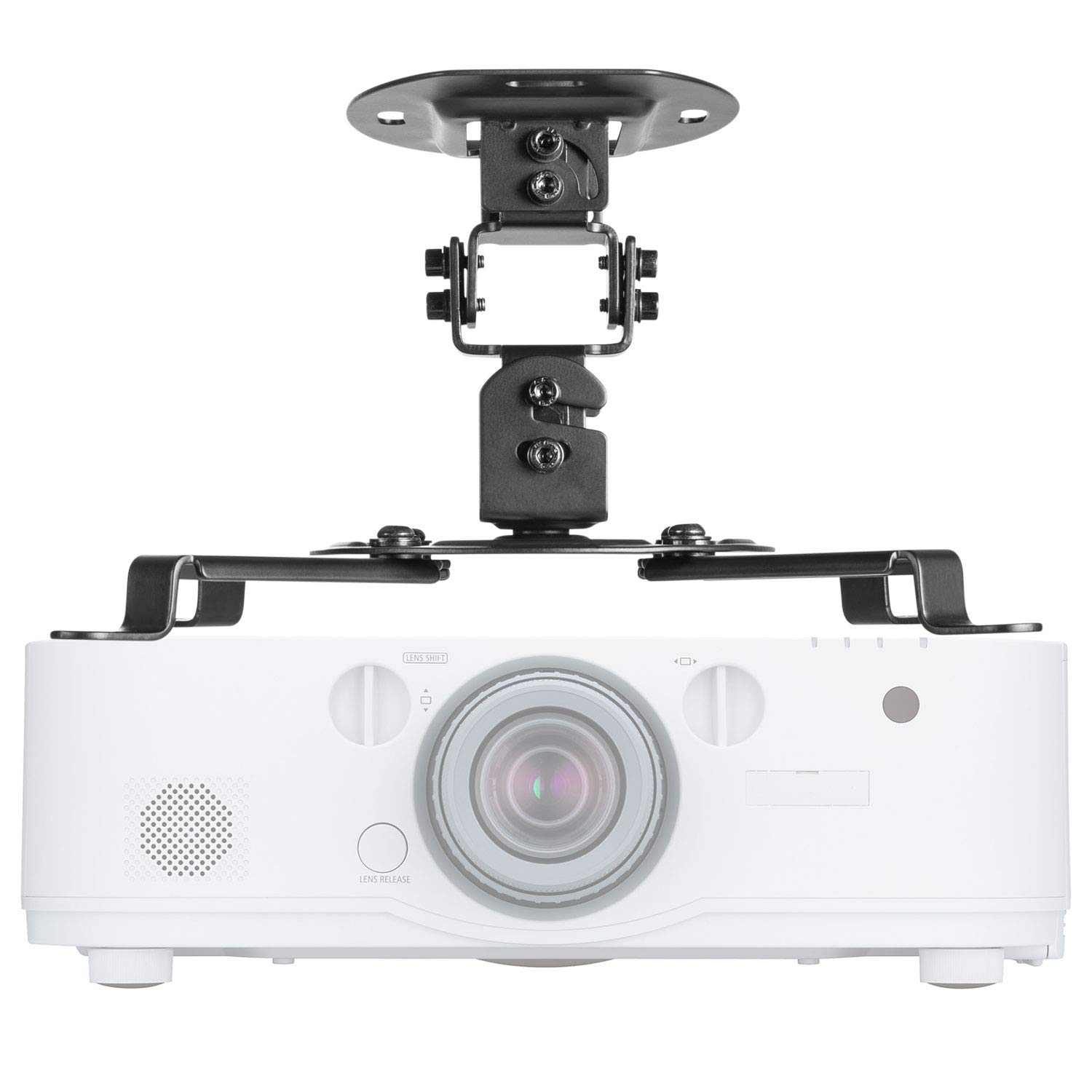
I’m not sure if there are differences in projector mounts. I just made sure the one I bought was compatible with the Epson 5040UB.

The projector mount I chose was the Universal Projector Mount Bracket.

I have a feeling that most mounts would work with most projectors, but I wanted to make sure I wasn’t going to have a problem with it.

This mount definitely works, although if I had to do it again, I probably would have gotten on that was a bit more sturdy.

Begrijp me niet verkeerd; If your projector is going to be out of reach of most people, then this mount will work out perfectly.

In my case, since I have the raised platforms, the projector does stand a chance of getting bumped by someone who is tall and not paying attention to where they’re going. 🙂

The projector won’t fall or anything, but if it’s a substantial bump, it may shift a little requiring a readjustment of the projector image on the screen.


[et_bloom_inline optin_id=”optin_7″]

Designing a Home Theater - The Video Projector - The Video Projector Mount

The Video Projector Mount

Projectiescherm LED KIT Versie 2018 (135-inch diagonaal scherm, 16:9 Beeldverhouding)

Was That Helpful?

I hope this article will help you choose the right projector for you. This was my first projector purchase so there is nothing else I can compare it to, but I can tell you that I am incredibly happy with choosing the Epson Home Cinema 5040UB.

Are you thinking of getting an Epson? What other projector are you thinking of getting? Laat het me weten in de reacties hieronder!

Geniet van dit bericht? Pin het en deel het met anderen!

DIY Home Theater Design - Choosing The Right Projector

Home Theatre -ontwerp – Het vaste projectorscherm

Home Theatre -ontwerp – Het vaste projectorscherm

Designing a Home Theater - Home Theater System - Choosing A Fixed Projector Screen


Het selecteren van een vast projectiescherm zou de volgende keuze moeten zijn na het kopen van een projector. Bij het ontwerpen van een thuis theater, er is heel veel onderzoek nodig en er moeten veel keuzes worden gemaakt. Niet in de laatste plaats welk vast projectorscherm u moet kopen.

Hier bespreek ik welke mogelijkheden er zijn op het gebied van projectieschermen en waarom ik voor een vast projectiescherm heb gekozen.

Openbaring: Sommige van de onderstaande links zijn gelieerde links. Als u besluit een van deze producten te kopen, We verdienen een kleine commissie zonder extra kosten voor u. We raden deze producten alleen aan omdat we er ervaring mee hebben en ze gebruiken voor onze eigen projecten. Als Amazon Associates, We verdienen aan kwalificerende aankopen.

Wat ik zocht in een vast projectorscherm

Eerlijk gezegd, Toen ik voor het eerst met mijn onderzoek begon, dacht ik niet dat het type projectorscherm er zoveel toe zou doen.

Na wat onderzoek te hebben gedaan, realiseerde ik me al snel dat het projectorscherm veel te maken heeft met hoe scherp het beeld zal zijn.

Zoals ik al zei in het artikel over de projector, de knapperigheid is iets waar ik echt naar op zoek was.

Mijn indruk van projectoren is altijd een erg vervaagd beeld geweest dat moeilijk te zien was tenzij de kamer volledig donker was.

Ik wilde dat effect met mijn opstelling echt zoveel mogelijk minimaliseren.

Omdat mijn bioscoop ramen heeft, zou omgevingslicht een factor zijn, en ik verwachtte dat ik soms tv zou willen kijken met het licht aan.

Ik wist niet dat het kiezen van het juiste projectorscherm een ​​grote invloed zou hebben op de scherpte van het beeld.

De verschillende soorten projectorschermen

Als je enig onderzoek hebt gedaan naar projectorschermen, dan weet je dat er heel veel keuze is.

Beeldverhouding projectorscherm

Er zijn twee basisbeeldverhoudingen voor schermen 4:3 en 16:9. De makkelijke manier om erover na te denken is dat 4:3 is een oud tv-formaat (meer een vierkant) en 16:9 is het nieuwe flatscreen-tv-formaat (een lange rechthoekige vorm).

Geen hersenkraker voor mij, Ik wilde 16:9 omdat dat tegenwoordig een beetje de nieuwe standaard is.

Designing a Home Theater - Home Theater System - Screen Aspect Ratios

Intrekbaar of vast frame

Intrekbare projectorschermen zijn degenen die u naar beneden kunt trekken, vergelijkbaar met wat je op school tegenkomt. De andere optie is een projectiescherm met een vast frame.

In mijn geval is de kamer een speciale bioscoop, mijn scherm hoefde dus niet ingetrokken te worden.

Ze zeggen dat de beeldkwaliteit beter is op een vast frame omdat er veel minder beweging is.

Designing a Home Theater - The Fixed Projector Screen - A Retractable Screen
Designing a Home Theater - The Fixed Projector Screen - Elite Screens - A Fixed Projector Screen

De schermkleur – Wit, Grijs of zwart

Dit was iets waar ik nog nooit aan had gedacht of waar ik nog nooit van had gehoord. Ik heb projectorschermen altijd in het wit gezien, blijkbaar zijn ze er ook in grijs en zwart.

Ik begreep de verschillen eerst niet, maar na wat onderzoek was het volkomen logisch.

de projector kan geen zwart projecteren, dus het hebben van een donkerder scherm verhoogt in wezen de contrastverhouding (het verschil tussen de witste wittinten en de zwartste zwarttinten op het scherm).

Een zwart scherm geeft je de beste contrastverhouding, terwijl een wit scherm de slechtste is. Zwarte schermen zijn ook veel duurder. Ik ging voor grijs, het is de middenweg voor zowel de contrastverhouding als de prijs.

Schermen met voorverlichting of achtergrondverlichting

Als je de ruimte hebt, kun je een scherm met achtergrondverlichting gebruiken, Dit betekent dat de projector zich achter het scherm bevindt.

In mijn geval wilde ik al het onroerend goed dat ik had gebruiken voor de bioscoop, dus bleef ik bij een scherm met verlichting aan de voorkant.

Gescherpt of randloos

Er zijn schermen met een rand eromheen, waardoor het een meer traditionele uitstraling krijgt, of er zijn schermen die randloos zijn – Dit betekent dat het beeld helemaal tot aan de rand van het scherm kan reiken.

Toen ik naar schermen begon te kijken, maakte dit mij niet zoveel uit. Er waren beide, scherpe en randloze schermen die er geweldig uitzagen.


Akoestisch projectiescherm of niet?

Nu is dit iets waar ik misschien voor had gekozen als ik meer ruimte had om speakers achter het scherm te plaatsen.

Het akoestische scherm laat geluid door, op die manier kunnen de middenluidspreker en de linker en rechter surround sound-luidsprekers achter het scherm worden geplaatst.

Het zou een hele mooie uitstraling hebben opgeleverd, maar omdat omgevingslicht voor mij belangrijker was dan het plaatsen van de luidsprekers achter het scherm, besloot ik me te concentreren op een scherm dat goed zou werken met omgevingslicht.

Het uitzoeken van de schermgrootte

Dit was een beetje een lastige. Ik wilde het grootste scherm dat aan mijn muur kon passen.

Het grootste scherm dat ik kon krijgen zou de breedte van de muur zijn minus de breedte van de linker en rechter surround sound-luidsprekers.

De hoogte werd beperkt door de hoogte van de muur minus de ruimte erboven voor de infraroodrepeater, minus de hoogte die nodig is om de onderkant van het scherm vanaf de achterste rij te zien.

Omdat ik al had uitgezocht wat mijn projector zou worden, kon ik de schermgrootte berekenen met behulp van deze ongelooflijk nuttige berekening hulpmiddel.

Gebruik de schermgroottecalculator

Klik op deze knop om naar de site te gaan waar ik heb bepaald welk schermformaat ik in de kamer moet gebruiken.

Het baseert het op de videoprojector en de plaatsing van de projector in de kamer.

Omdat ik het modelprojector kende, hielp het niet alleen bij het bepalen van de grootte van mijn scherm, het hielp me ook erachter te komen waar mijn projector aan het plafond moest worden gemonteerd.

Met behulp van de tool kon ik beslissen over de 135″ scherm en dat de projector 178 zou zijn″ weg van de schermwand.

Het mooiste vaste projectorscherm

Het eerste niet-witte scherm dat ik tegenkwam waren de Black Diamond-schermen. Heilige koe, het zag er sexy uit!

Als de projector uitstaat, heb je eigenlijk een zwart scherm aan de muur, als een enorm flatscreen. Dit is absoluut het scherm waar ik voor zou zijn gegaan als de prijs geen rol speelde – voor mij was het dat wel.

Het Black Diamond-scherm zou me meer hebben gekost dan de Epson 5040UB. Veel te veel voor mij om uit te geven.

Nu zocht ik naar de beste waarde voor mijn geld

Omdat de zwarte diamant helemaal niet in mijn budget paste, Ik moest iets vinden dat er dichtbij stond en binnen mijn budget paste.

Ik wilde echt niet meer dan $ 1000 uitgeven voor mijn scherm, dus dat was de limiet die ik mezelf stelde.

Ik kwam de Elite schermen tegen en het bleek een gerenommeerde schermfabrikant te zijn. De schermen die ze hadden, pasten ook in mijn budget.

Nu ik wist dat Elite-schermen het merk was dat ik ging kopen, keek ik naar de verschillende schermen die ze aanboden om te zien welke het beste voor mij was.

Het scherm dat ik uiteindelijk heb gekozen was de Aeon 135″ 16:9 omgevingslichtafstotend ALR Fixed Frame Edge Free Projectiescherm, modelnr. AR135DHD3

Het vaste projectorscherm dat ik heb gekozen

Click To Get The Same Home Theater System - Yamaha TS-R7810

Het projectorscherm dat ik heb gekozen

Elite Screens Aeon CineGrey 3D-serie, 135 inch 16:9, Omgevingslicht afwijzend projectiescherm met vast frame en randvrij projectiescherm, AR135DHD3

Het randloze vaste projectiescherm

De schuine achterkant van dit vaste projectiescherm zorgt voor een strakke uitstraling, sjiek gevoel.

De foto rechts laat zien hoe het scherm met een beeld erop wordt geprojecteerd. Ik vind het mooi hoe het beeld helemaal tot aan de rand doorloopt.

Designing a Home Theater - The Fixed Projector Screen - The Edgeless Screen

Waarom ik voor dit scherm heb gekozen

Ik heb voor dit scherm gekozen omdat het goede recensies kreeg en het speciaal is ontworpen voor kamers met omgevingslicht.

De specificaties vermeldden ook dat het zou werken met 3D-films, die ik van plan was te gebruiken.

Het scherm is een randloos scherm, wat betekent dat u het beeld helemaal tot aan de rand van het scherm kunt projecteren voor een werkelijk indrukwekkende weergave.

Het randloze scherm geeft het gevoel van een gigantische flatscreen-tv.

Als u liever een kader rond het scherm heeft, ze leveren ook vilttape die je om de rand kunt plakken. Het geeft het meer een traditioneel tv-gevoel.

Persoonlijk vind ik het leuk om een ​​afbeelding te hebben die het hele scherm beslaat.

Het scherm monteren

Het in elkaar zetten van het scherm was een beetje lastig.

Ik heb er recensies over gelezen waarin werd gezegd dat je voorzichtig moest zijn met de scherpe metalen randen van het frame, en ik begrijp waarom.

Het vergt nogal wat werk om het schermmateriaal zover te krijgen dat het het frame bedekt.

Als je eenmaal een beetje met het zeefmateriaal hebt gewerkt, zul je beseffen dat het behoorlijk wat meegeeft… je wilt er gewoon de tijd voor nemen.

We zijn eigenlijk eerst vanaf de korte kant begonnen, het scherm verbinden met de uiterste rand van het klittenband op het frame. Dat was het moeilijkste deel.

Toen we eenmaal aan beide uiteinden een klein gedeelte hadden verbonden, was het een kwestie van door het frame heen werken.

Naarmate u zich een weg baant, wordt het steeds gemakkelijker om het klittenband aan te sluiten.

Optionele achtergrondverlichtingsset

De achtergrondverlichting is een leuke touch…

Het scherm heeft ook deze optionele LED-achtergrondverlichtingsset, wat zorgde voor een ongelooflijk sexy look.

Ik kocht de kit rechtstreeks bij Elite-schermen omdat ze de 135 niet hadden″ model beschikbaar op Amazon.

De optionele LED-achtergrondverlichtingsset installeren

Het modelnummer van de achtergrondverlichtingsset voor de 135″ schermen is ZLED135H1.

Het installeren van de achtergrondverlichting was vrij eenvoudig.

Begin met uitzoeken waar je de stekker voor de lampen wilt hebben, dat zal je uitgangspunt zijn.

Leg het scherm met de voorkant naar beneden op de grond, Begin waar u de stekker wilt hebben, verwijder het plakband en plak de lampen op het schuine achtergedeelte van het scherm.

Je hebt een beetje extra als je over het scherm gaat, knip gewoon de strip af op de indicatielijnen die ze om de paar centimeter hebben.

Eén ding om op te letten is dat de lichtstrip behoorlijk gevoelig is voor buigen.

Wees voorzichtig en zorg ervoor dat u de strip niet knikt en probeer bij het maken van de hoeken de hoek rond te maken – vermijd scherpe hoeken.

De achtergrondverlichting was het waard, het geeft een geweldige afwerking aan het scherm. Mijn favoriete lichtinstelling is weinig licht met wit licht.


[et_bloom_inline optin_id=”optin_7″]
Designing a Home Theater - The Fixed Projector Screen - The LED Kit

De LED-achtergrondverlichtingsset

Projectiescherm LED KIT Versie 2018 (135-inch diagonaal scherm, 16:9 Beeldverhouding)

Geniet van dit bericht? Pin het en deel het met anderen!

DIY Home Theater Design The Fixed Projector Screen

Home Theatre -ontwerp – De passieve subwoofer versterker

Home Theatre -ontwerp – De passieve subwoofer versterker

Designing a Home Theater - Home Theater Passive Subwoofer Amplifier - OSD Audio SMP250 250-Watt Single Channel


When Do You Need A Passive Subwoofer Amplifier

Een passieve subwooferversterker is meestal nodig als u een subwooferluidspreker in de muur heeft.

Het home theatre-systeem heeft een subwooferuitgang. maar het is een passieve output. Dit betekent dat de uitvoer niet wordt versterkt.

So you need either use an active subwoofer (a subwoofer enclosure with an amplifier built-in) or a passive subwoofer amplifier.

Searching For A Subwoofer Amplifier

The criteria for a subwoofer amplifier is pretty simple. It needs to be strong enough to power the sub-woofers and something that could be triggered on and off from the thuis theater systemremoving the need for yet another remote control.

And of course a subwoofer amplifier that’s not too expensive would be nice.

When doing the searches for a subwoofer amplifier many of the search results will be for 12 volt car stereo amplifiersnot exactly what you’re looking for. lol

One good way to get search results to be more relevant is by searching for 8ohm subwoofer amplifier. Typical house speakers are 8ohm and car speakers are 4ohm.

The Passive Subwoofer Amplifier I Chose

The subwoofer amp I chose is the OSD Audio SMP250; 250-Watt Single Channel Subwoofer Power Amplifier.

I chose this amplifier mainly because of the wattage, the 12V trigger and the price.

Two of the three criteria ended up not being a factor. But they where what I was looking for when I first started my search.

Designing a Home Theater - Home Theater Passive Subwoofer Amplifier - OSD Audio SMP250 250-Watt Single Channel

OSD Audio SMP250; 250-Watt Single Channel Mono High Current Class A/B Subwoofer Power Amplifier with Front Panel Phase Switch, Adjustable High-Cut Filter and Volume Knob

Tips For This Amplifier

The OSD Audio SMP250 250-Watt Single Channel subwoofer amplifier works great. During this experience I learned quite a few things that you should also keep in mind.


The Subwoofer Amplifier’s 12 Volt Trigger

The 12 volt trigger is what the sub amp uses to detect when it should turn on. The triggerlistensfor sound coming to it and turns the amp on when it things it needs to turn on. That way it would turn itself on/off without the need for a remote control.

The trigger did technically work the way it should have. The amplifier did turn on when it detected that it needed to.

But when it did, the subwoofer made a really loud popping sound when the amplifier turned on.

Tech support even sent me a replacement amp but the new amp also made the popping sound.

I instead changed the subwoofer amp trigger to be on all the time, which turned out perfect.

The amp does go into stand-by mode when it doesn’t receive an audio signal. Then when it comes out of stand-by, it doesn’t make a popping sound!

250 Watts

This one is a good problem, in a way. lol

One of the reasons I chose the OSD Audio SMP250 passive subwoofer amplifier was because of the wattage. Since the subwoofers are 300 watt speakers, I wanted an amplifier strong enough to power them.

Eerlijk gezegd, I could have gone with a less powerful amplifier and the bass would have been fantastic.

This amplifier was more than enough to power my subwoofers. There is a level volume control on the back of the amp which I set to about half way and the subs basically shake the house.

This is a Mono Subwoofer Amplifier

This is a mono subwoofer amp, meaning there’s one output channel. And I have two subwoofers.

The subwoofer amplifier manual does have a workaround. It says the speakers will get the power they need if they’re connected in parallel.

So that’s what I did. In principe, I have the speaker wire for both subwoofers squished into one banana plug.

[et_bloom_inline optin_id=”optin_7″]

Home Theatre -ontwerp – Een thuisbioscoopsysteem kiezen

Home Theatre -ontwerp – Een thuisbioscoopsysteem kiezen

Designing a Home Theater - Home Theater System Amplifier - Yamaha TS-R7810


Zoals de projector en het projectorscherm, there are many options for a thuis theater system or amplifier. En net als de projector, de sky is the limit als het om prijzen gaat.

Het eerste dat u moet uitzoeken bij het zoeken naar uw thuisbioscoopsysteem, is welke functies voor u belangrijk zijn.

If you were like me, you don’t even know what features you’re looking for.

Hopelijk, my research will help cut a few hours off your amplifier search.

Openbaring: Sommige van de onderstaande links zijn gelieerde links. Als u besluit een van deze producten te kopen, We verdienen een kleine commissie zonder extra kosten voor u. We raden deze producten alleen aan omdat we er ervaring mee hebben en ze gebruiken voor onze eigen projecten. Als Amazon Associates, We verdienen aan kwalificerende aankopen.

What I Was Looking For In A Home Theater System

For the surround sound system, my criteria list was pretty straight forward:

  • 5.1 surround sound
  • Enough HDMI inputs (since the home theater system was going to control the inputs)
  • a good enough wattage to get my attention

The home theater system is the heart of your theater setup. It controls all the video sources, so all the video signals pass through it. Since the projector in my setup was both 4K and HDR capable, the amplifier needed to support both 4K and HDR.

Designing a Home Theater - Home Theater System - The Home Theater System Amplifier Is The Heart Of The Home

Options For A Home Theater System

Dolby Digital Options

Dolby, THX or DTS

There are three different standards for a home theater system – Dolby, THX, and DTS.

By far, the most common standard of the three is Dolby digital. I wasn’t able to figure out the differences between the threeother than THX and DTS usually cost more.

Because THX and DTS cost more, the choice, in the end, was more about which flavor of Dolby to get.

Which flavor really depends a lot on the speaker budget – and how many speakers can fit into that budget.

What Flavor Of Dolby?

I have always heard of Dolby Digital 5.1 but never really knew what the numbers meant. All I knew was that 5.1 was a good surround sound system.

In my search for a surround sound system, I finally understood the numbers.

A 5.1 system means there are 5 surround sound speakers and 1 subwoofer.
The 5 surround sound speakers would be:

  • the center speaker
  • left and right front speakers
  • left and right rear speakers

In our days, there are a lot of systems that are Dolby Digital 7.1 surround sound. The difference between 7.1 surround sound system and the 5.1 is an additional two back speakers.

When shopping for speaker systems, you’ll come across a third number, like 5.1.2 or 7.1.4. That third number is the number of in-ceiling speakers, also called presence speakers.

The latest iteration of Dolby is Dolby Atmos. The way they describe it is that is object-oriented sound. Which means Atmos does a better job of determining what sound should be sent to which speaker.

Below is a table with the different Dolby speaker layouts.

The Different Dolby Speaker Layouts

Speaker
5.1
5.1.2
5.2.2
7.1
7.2
7.1.2
Center Speaker
X
X
X
X
X
X
Left Front Speaker
X
X
X
X
X
X
Right Front Speaker
X
X
X
X
X
X
Left Rear Speaker
X
X
X
X
X
X
Right Rear Speaker
X
X
X
X
X
X
Second Left Rear Speaker
X
X
X
Second Right Rear Speaker
X
X
X
Ceiling Speaker Count
0
2
2
0
0
2
Subwoofer Count
1
1
2
1
2
1

If you want more details about the different Dolby speaker setups, below is a great link from Dolby. (Fair warning it gets pretty speaker geeky)

Dolby Atmos Speaker Setup Guide


Other Features Available

There are a lot of features available on home theater systems. But most of them aren’t a factor for a dedicated home theater system.

In my case, the surround sound system was only for the movie theater. And really only for the audio from a TV, DVD, NetFlix, enz…

Features like multi-zone, Bluetooth streaming, wifi streaming, and network audio playback are available. But none of those mattered in my setup at all.

The Home Theater System I Chose

Zoals ik al eerder zei, your speaker budget will be the driving force behind your home theater system decision.

In the end, I found a great price on a set of 7.2 speakers, so I knew I could start looking for a Dolby 7.2 home theater system.

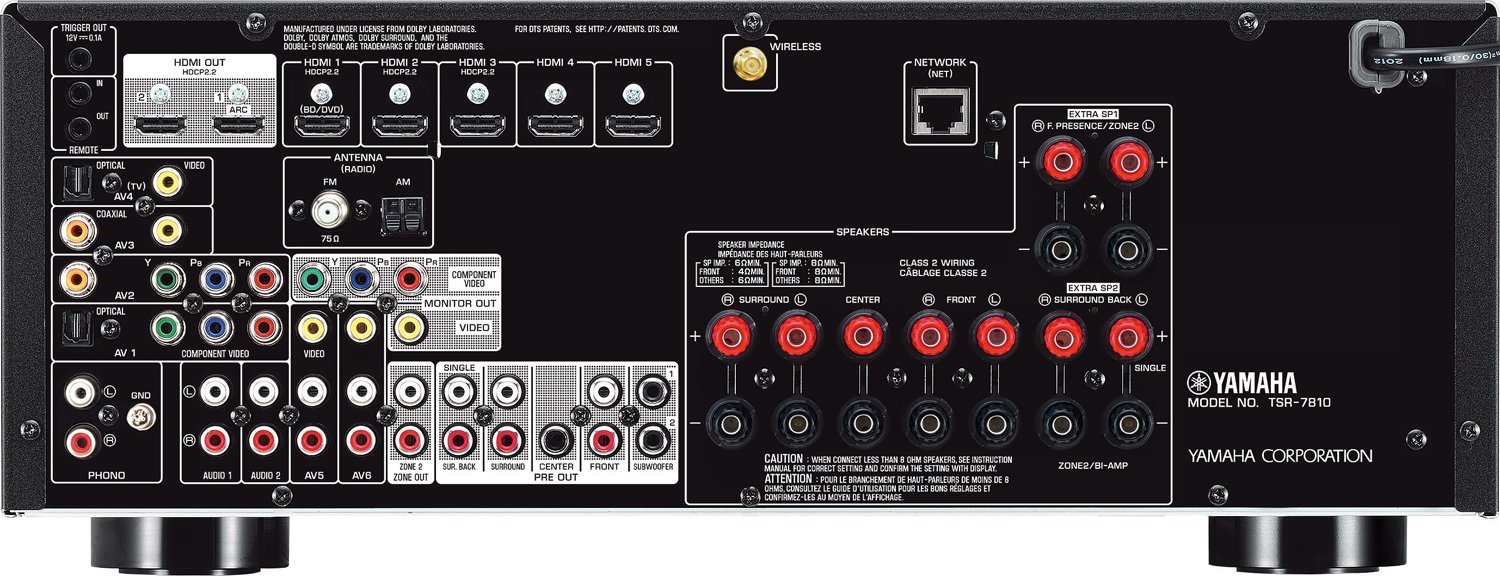
The amplifier I ended up going with is the Yamaha TSR-7810 7.2-Channel Network Receiver, which I purchased online.

It had great reviews and more than enough features for my setup at a reasonable price.

The amplifier has 7.2 channel surround sound, DTS:X, Dolby Atmos, the 4K HDR passthrough and support for 3D. It met all the criteria from my list, and it was also a reasonable price.

Designing a Home Theater - Home Theater System Amplifier - Yamaha TS-R7810
Designing a Home Theater - Home Theater System - Yamaha TS-R7810 - Back

Get The Same Home Theater System Amplifier

Click To Get The Same Home Theater System Amplifier - Yamaha TS-R7810

Yamaha TS-R7810 7.2-Ch x 95 Watts Networking A/V Receiver Same as RX-V781

Tips For This Home Theater System

Here are a few tips that’ll help your Yamaha TSR-7810 amplifier sound it’s best.

Make Sure To Run The YPAO Test

The YPAO test made a significant improvement in my setup.

I would definitely recommend running the test if you have a Yamaha home theater system that has YPAO.

The amp comes with a microphone that you plug into the front of the amp. All you need to do is center the microphone in the listening space and start the test.

Make sure you’re not standing between the microphone and any of the speakers while the test is being run.

That way, you don’t interfere with the microphone picking up the speaker sounds.

Designing a Home Theater - Home Theater System Amplifier - Yamaha TS-R7810 - YPAO Mic

When I ran my test, I placed the mic on the top of the center seat in the theater. Then I started the test and stayed out of the room until it was complete.

YPAO will do a few tests on the speakers and optimize the audio for the space.

I’d say there was a big difference in the surround sound quality after the test ran. Even a non-audiophile like me was able to tell the difference.

Enable The Enhancer Option

Sound quality is not always an easy thing to describe. But enabling the enhancer option on the amp gives the sound a nicer, deeper, fuller sound.


[et_bloom_inline optin_id=”optin_7″]

Make Sure To Get Banana Plugs

When there are only a couple of wires going to the back of your equipment the wires are totally manageable.

But when you have multiple speakers, things can get messy in a hurry. In this case, there were 9 sets of speaker wire along with all the HDMI and power cables.

Banana plugs help make the wire management manageable.


The Banana Plugs I Chose

These banana plugs are great, they make the install much easier and cleaner.

They really helped with getting both subwoofer cables into a single port.

Mediabridge Banana PlugsCorrosion-Resistant 24K Gold-Plated Connectors12 Pair/24 Banana Plugs

Designing a Home Theater - Home Theater System - Banana Plugs

Something To Keep In Mind About Thuis Theater Systems

My past purchases for thuis theater systemen have always included powered (active) subwoofers.

An active subwoofer is one that has an amplifier built-in, a passive subwoofer doesn’t.

When you’re dealing with a passive subwoofer, you’ll need to buy a separate amplifier to power the subwoofer.

That was a fact that escaped me when I was doing my research for a thuis theater system. I only figured it out when I installed the amplifier and speakers, and sadly, my subwoofers had no sound coming out of them.

After a few web searches, I found out I needed to buy a separate passive subwoofer amplifier.


Home Theatre -ontwerp – Thuisbioscoopluidsprekers

Home Theatre -ontwerp – Thuisbioscoopluidsprekers

DIY Home Theater Design - The Best Home Theater Speakers For The Money


Wanneer u uw thuisbioscoop ontwerpt, het is het beste om naar beide te kijken, uw versterker en luidsprekers tegelijk.

Het een heeft invloed op het ander, dus als u ze allebei tegelijkertijd onderzoekt, kunt u voor beide de beste keuze maken. Dit artikel richt zich op thuisbioscoopluidsprekers. For more details about the amplifier, make sure to check out the article in this series on the amplifier.

Openbaring: Sommige van de onderstaande links zijn gelieerde links. Als u besluit een van deze producten te kopen, We verdienen een kleine commissie zonder extra kosten voor u. We raden deze producten alleen aan omdat we er ervaring mee hebben en ze gebruiken voor onze eigen projecten. Als Amazon Associates, We verdienen aan kwalificerende aankopen.

What Was I Looking For In Home Theater Speakers

The initial search criteria was simple, quality speakers and a reasonable price.

After a lot of searching, I soon realized I needed to find a reasonable price above anything else. These things are expensive!

If money was no object, I would go with Klipsch speakers. But those were many thousands of dollars, way outa my budget.

Now back to the search criteria. They needed to be affordable, in-wall, and a strong enough wattage that I could feel the sound from them. I figured a couple of hundred watts would be in the right ballpark.

I wanted in-wall speakers because I liked the finished look it gives.

To me, having speaker enclosures hanging around the room doesn’t give it as much of a finished look.

The Speakers

I did a good amount of searching, but honestly, the prices I kept coming up with were knocking the wind out of my sails.

Then I came across a company called Acoustic Audio. They had sets of in-wall speakers that were very reasonably priced.

Now I’m sure these speakers wouldn’t compare to the high-end speakers I kept finding in my searches. Maar, at less than 1/10th the cost they were the right choice for me.

The speakers I chose are the Acoustic Audio HD728 7.2 Home Theater Speaker System. There is an HD726 model as well, which is the same amount of speakers, just smaller speakers with a bit less power.

I’m pleased with these speakers; they sound and look great.

One thing that they don’t mention on Amazon’s listing was the rotatable tweeters. All the tweeters rotate, to get high pitched sounds directed at the listener.

I have a few tips with these speakers that I’ll share. In the end, these speakers are great once you follow the tips.

Designing a Home Theater - Home Theater Speakers - acoustic audio hd728 in wall speakers

The Speakers I Chose

The speakers are the Acoustic Audio HD728 in-wall home theater 7.2 surround 8 inch speaker system.

They work great for me, just follow the tips I have below and you are sure to have the same results!

Acoustic Audio HD728 in-Wall/Ceiling Home Theater 7.2 Surround 8Speaker System

Tips For These Speakers

I have a bunch of tips for the Acoustic Audio hd728 speakers. As I said, I really like these speakers, and the tweaks I used helped make them an even better purchase.

Don’t Judge The Speakers Until They Are In The Walls

When the speakers came in the mail, I did what most people do when they receive their speakers. At least I hope I’m not the only one that did this. 🙂

I felt like a kid on Christmas morning, I was dying to see what the speaker sounded like. So I ran to the movie theater and plugged them in without installing them in the walls.

It was a bit of a buzz kill – the speaker sounded like they were all tweet with no woof.

Luckily I didn’t act on impulse and return them. The thing to keep in mind with any speaker is they can only provide bass when there is some sort of air resistance. The speakers need an enclosure around them for air resistance.

In the case of in-wall speakers, they use the walls themselves to provide that resistance.

Once the speakers were in the walls, the mid-tones and deep basses came out, and the sound was great!


Thuisbioscoopluidsprekers – The Placement

The speaker placement took some time to figure out. Between the surround sound aspect of it and which speaker should go where it was a lot to put together.

Unfortunately, the speakers I bought don’t really specify which speaker is for what.

I did a lot of digging around in posts, forums, and reviews. With some process of elimination, I figured out where each speaker should go.

If you also buy one of the Acoustic Audio speaker systemen, this will help you save hours on guesswork.

The Acoustic Audio speaker system I bought was the HD728. Acoustic Audio has several speaker packages, but they all seem to use the same speakers.

Here are the speakers the Acoustic Audio hd728 system came with and where I installed them.

(4) HD800 Front In-Wall Speakers – These are the rectangular speakers – I used them as the Front Left and Right speakers and the Front Left and Right presence speakers (in the ceiling)

(2) HD8 Rear In-Ceiling Speakers – The smaller round speakers with a round frame – I used these as the rear left and right surround speakers.

(1) HD6c Dedicated In-Wall Center Channel Speaker – The long rectangular speaker – it goes under the projector screen.

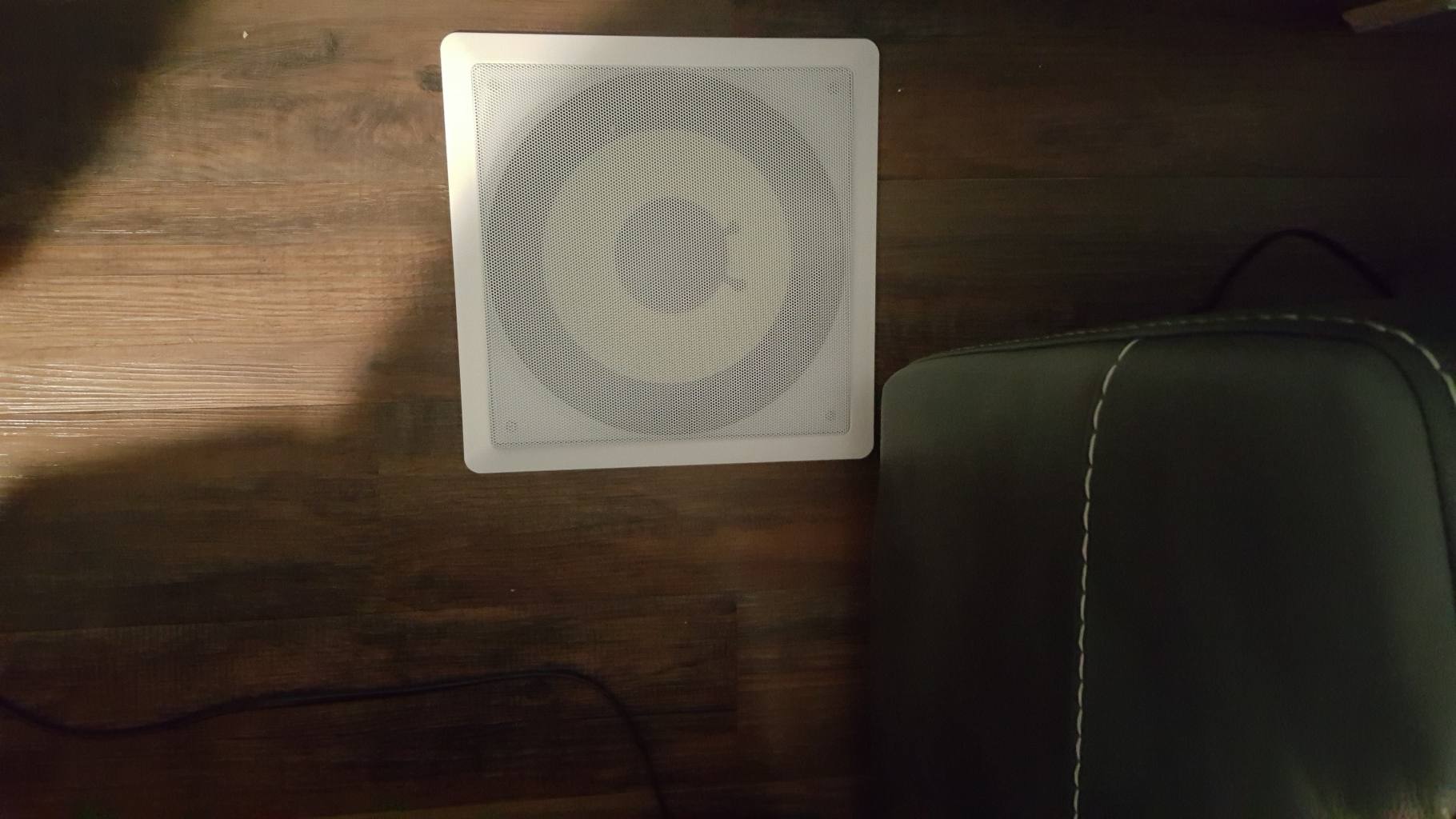
(2) HDS10 Dedicated 10-inch In-Wall Passive Subwoofers – The larger round speakers – Some posts said spreading the deep bass around the room makes the sound more immersive. So I put one in the bottom front right of the projector wall, and the other in the platform floor. Behind the back row of chairs.

I used the surround sound amplifier documentation a lot to figure out the speaker layout.

The layout I used is 5.2.2:

  • 5 surround sound speakers (Front left and right, back left and right and center)
  • 2 subwoofers (in the floor in the back and in the projector wall in the front)
  • 2 presence speakers (in the ceiling in the front, just a little in front of the front row of chairs)

Below are a couple of diagrams that show the speaker placement.

Designing a Home Theater - Home Theater Speakers - The Speaker Layout or placement - Top View
Designing a Home Theater - Home Theater Speakers - The Speaker Layout or placement  - Front View

Best Bang For The Boom

Part of my theater design included a platform (a.k.a. a riser) for the second and third rows. I figured I’d use the platform as an enclosure for one of the subwoofers. So I installed the back subwoofer into the platform behind the third row of seats.

That was a fantastic way to get a whole lotta boom out of that subwoofer!

The entire platform (second and third row) shakes when that subwoofer kicks in.

If you have a riser in your theater, I’d recommend doing the same thing to get a better theater experience.

Seriously, It’s better than going to the movies. The entire riser is the encloser for the speaker, so its like you’re sitting on the speaker case.

Designing a Home Theater - Home Theater Speakers - acoustic audio hd728 - The Back Subwoofer

Buy Good Quality Speaker Wire

I read in many many links that a good speaker wire has a lot of impact on the speaker’s performance.

Inferior speaker wire will affect even the best speakers in the world.

The wiring that came with the speakers was incredibly thin wire. Do not use that wire.

Luckily I listened to the articles I read and ran 14AWG wiring to all the speakers.

My setup required me to crawl into the attic above the movie theater to run the speaker wires.

Going into crawl spaces is not my idea of fun. If I was going to into the crawl space, I was making sure that I was going to use the right speaker wire right off the bat.

Designing a Home Theater - Home Theater Speakers - Cable Matters 14 AWG CL2 in Wall Rated 100 feet Speaker Wire

The Speaker Wire I Bought

Cable Matters 14 AWG CL2 in Wall Rated Oxygen-Free Bare Copper 2 Conductor Speaker Wire (Speaker Cable) 100 Feet

In Ceiling/Wall Speakers Are Great But….

I loved the clean look of speakers in the walls and ceiling without the speaker boxes. For me, the boxes are eye-sores.
A gotcha with ceiling and wall speakers is where you install them. They need to be between studs, and that is not always possible.
In my case, I had studs that were right in the middle of where I was going to put the wall speakers. Both in the front and the back of the rooms.
My workaround for the front was to build a speaker enclosure around the projector screen.
In the end, it gave the wall a beautiful look, maar natuurlijk, it was much more work than zojuist making a hole for the speaker in the drywall.
I had read an Amazon review for the speakers that recommended making a plywood box and putting the box in the wall. They said the plywood gave much more depth to the speakers.
Uiteindelijk, my speakers ended up being in plywood boxes, and the bass from the speakers is fantastic.
I keep telling myself it’s the plywood that made the difference. To feel better about having to build out the boxes.
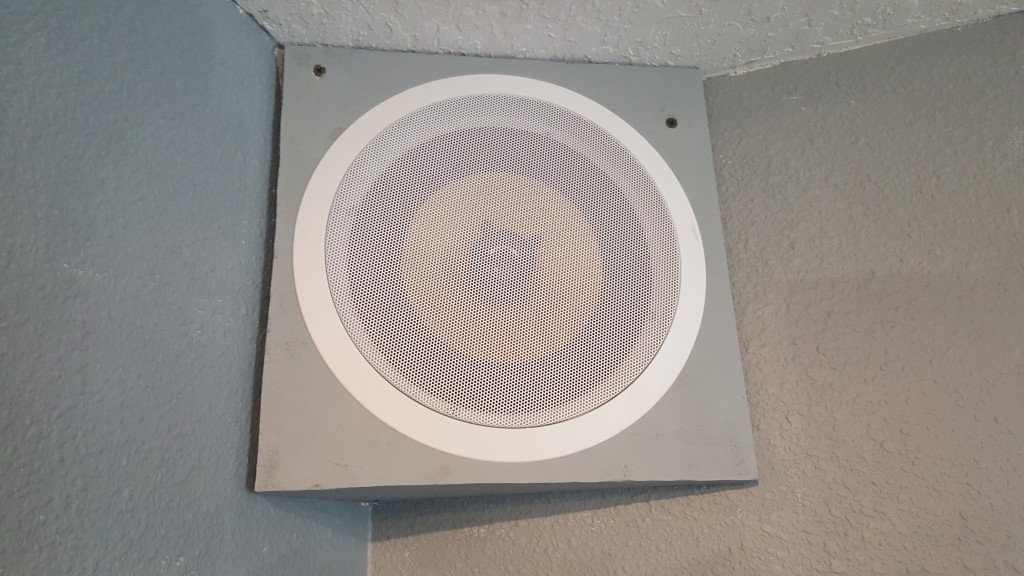
For the back wall, I didn’t want to build out large boxes. What I did instead is make small boxes, and I angled them, so they didn’t look too strange. I also made a hole in the drywall to give the speakers more air space to work with.
Having them angled also directed the sound into the center of the room better.

The Front Speaker Enclosures

Here are the details for the front speaker enclosure, in case you’d like to do something similar for your setup.

The enclosure is constructed of 3/4″ OSB plywood, with 1/2 drywall covering it.

The Dividers

The front enclosure is one big box, that’s divided into three sections. That way, each speaker has its own air space.

I figured it was a good thing to do to prevent the speakers from interfering with each other.

The double gray lines show where I put the section dividers, which are also made of 3/4″ pieces of OSB plywood.

Designing a Home Theater - Home Theater Speakers - The Front Speaker Enclosure and speaker layout or placement - Front View
Designing a Home Theater - Home Theater Speakers - The Front Speaker Enclosure - Top View

Speaker Enclosure For The Back Speakers

The boxes for the back were pretty simple. They also needed a box because the studs didn’t line up where I wanted to place the back speakers.

For the back speakers, they were butting up to the ceiling and the wall. Because of that, they only needed plywood for the face and the bottom.

The plywood for the face of the speaker is 12″ x 12″. The bottom of the box including the face is 6″ x 12″ x 11″

Here are some pics of the back speaker enclosure. Because there wasn’t enough air space created by the box, I cut out the drywall hidden behind the speaker box. It gave the speakers a little more space to work with.

Designing a Home Theater - Home Theater Speakers - acoustic audio hd728 - The Back Speaker Enclosure - Front View
Designing a Home Theater - Home Theater Speakers - acoustic audio hd728 - The Back Speaker Enclosure - Bottom View

A Modification To The Plastic Clips

One thing the manufacturer did skimp out on is the plastic clip that holds the speakers in place.

I ended up modifying the clips to make it easy for the clips to open and close.

Without the modification, the plastic clips can break when installing the speaker.

The Modification

Unmodified, the plastic clips catch the edging of the plastic speaker frame. If you continue to screw it in, the plastic where the screw head sits will break (ask me how I know that).

The modification is simple. Once done, you’ll be able to screw and unscrew the speakers without a problem.

It’s only a matter of removing the corner of plastic and angling it, so it directs the clip where to go.

Do that to each clip, on each speaker, and you’ll be all set.

Cut This Corner Out

Designing a Home Theater - Home Theater Speakers - acoustic audio hd728 - Cut This Plastic Corner Of The Speaker

[et_bloom_inline optin_id=”optin_7″]

Choosing The Right Home Theater Speakers

I hope the information in this article helps you with your choice for home theater speakers.

These speakers are fantastic. I’m sure there are other speakers out there that are even better, but for the moneythese speakers can’t be beaten!

Are you planning on getting the same speakers? What speakers are you thinking of getting instead?

Let me what you think about them in the comments below.


Geniet van dit bericht? Pin het en deel het met anderen!

DIY Home Theater Design - The Best Home Theater Speakers For The Money